Showing posts with label BLACKBERRY. Show all posts

5 Problems and solutions Blackberry Software Most Frequently found

1. Emails have been deleted but are still stored. 
    This is because in fact the deleted emails are still stored in the "deleted items folder" which sometimes causes a database error or out of sync. A simple solution is to permanently delete emails from outlook inbox by pressing the "Shift" and "Delete" keys simultaneously, or can be manually by deleting all the emails are still stored in the "deleted items folder". 

2. Emails can not be entered and saved into the inbox folder. 
    Because the inbox memory is full, then no new emails can be stored in the inbox. how to fix this error is to re-register by going to (main menu, advance option, navigate to the host rotating table, select the menu, register now, and registration message sent) 

3. Can not send email 
    This error is usually caused by a network service problem (GPRS/3G) or did not find GPRS/3G signal. simple things you can do to fix this error is to perform a soft reset and hard reset on the BB handheld. 
Soft reset : in standby press (ALT + CAP + DELETE) simultaneously. 
Hard reset : press the reset button located on the back of the handheld. 

4. Auto power off when going to answer the call 
    This software error caused the BlackBerry rare memory refresh, remove the battery for 5-10 minutes, in order to refresh the memory and make it a habit to do once a week. 

5. Often blank lcd screen 
    On mobile devices that already use the Operating System, this is often the case, is no exception to the BB.do the handling of the most lightweight and low-risk first 
a. perform a soft reset and unplug the external memory 
b. upgrade or downgrade software / operating system 
c. if steps a and b are not successful, the possibility of damage to hardware or lcd.
read more...

Cross Battery problem on BlackBerry 83xx

        On the BlackBerry handheld 83xx series or the other, often have problems such as cross-battery logo when plugging the usb cable to the device. whether this software or hardware problem? 
        This software can also be hardware problem, check the damage with the following steps :
1. if the handheld is still detected in Desktop Manager may still be solved with software flashing or by reprogramming the operating system. cause is cod files on the system load is missing or corrupt.
2. but if not detected in the DM or other tools, this means the damage is certainly a hardware problem, the battery circuit conductor paths are not normal. 
steps of checking the hardware : 
1. check battery, can be a simple way to switch a normal handheld battery. 
2. either clean the battery connector on pcb or on battery 
3. check "crystal 91HCE2" (resolder / change) 
4. inductor component checks all around power-ic 
5. check the "regulator 907 ps 12" (resolder / change) 
for step 3,4,5 please look at the scheme.
        If the above steps have been conducted, but cross-battery problem persists, then it entered the advanced damage, which I will discuss in the next post.

read more...

Make Blackberry Browser Faster

        Speed up blackberry browser tricks only maximize the performance while minimizing the appearance or browser features. a major impact on browsing speed is a provider of cellular service network. 
        But with these tips we can accelerate browsing on hendheld than to use your full featured. Sett BlackBerry's browser as below :


1. Open Browser
2. Click "BB" logo
3. Click Browser Configuration
4. Check on the "Prompt to enable javascript" and "Use foreground and background"
5. Unchecked the others option
6. Exit and save

        With a setting like this, the display will be old fashioned but the browsing speed will be better.
        Also make sure you use "Internet Browser" as the default gateway route in the "Browser Configuration" and "General Properties" in the BB browser options menu. This means that browser will be redirected to the RIM network via the operator.
Clean browser cache memory as often as possible to increase the speed with the following steps :

1. Open browser
2. Click "BB" logo
3. Click options
4. Click Cache Operations
5. Click Clear to all options such as, content cache, Pushed content, cookie cache.
6. Exit and the BB will do the "cleaning memory".
read more...

Easy step BlackBerry GPS Setup


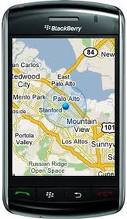
        Some BlackBerry models are like Curve, Bold, Javelin or Storm, etc. .. been equipped with a built GPS, which can be used for navigation activities, determine the position, geotagging photos, etc.
        To access the GPS we can use BB maps or google maps on hendheld, then our position will appear on the map and of course we must have a package of BIS (Blackberry Internet Service) enabled.

The following is a brief tutorial how GPS Settings on Blackberry :


1. Access the Options menu, Advanced Options and select the GPS. ( it takes you to the GPS menu)
2. Access Options, GPS Services, and click the trackball / Ok and then select the Location ON.
3. Run BB maps or Google maps, if no constraints, would your position will appear on the map.


read more...

HTML Email Setup on BlackBerry

        
         There are several steps you should do to Setup HTML email on the BlackBerry, including conditions that must exist in the blackberry handheld. In this post I will describe the requirements and also the steps to activate the Blackberry HTML email.

        Requirements that must be met to follow the activation steps :
1. BlackBerry OS version must be at least 4.5.0 and above, if you still use OS under 4.5.0 please update first.
2. BIS providers must have been activated.
3. activate / re-register your email on BIS providers, either through the handheld via BIS provider icon's or via internet computer, if successful your  BIS providers will respond via SMS to your handheld.

        If the requirements are available on the handheld, go to step activation :
1. Reset your handheld by removing the battery, then press and hold power_on button 2-5 seconds, and insert the battery again, .. wait until handheld power up with normal again.
2. Open the messages folder 
3. Click on a reply message from BIS providers 
4. Click Options
5. Click Email Settings
6. Enable HTML email = yes
7. Download Images Automatically = yes
8. Setting the TCP / APN to the mode "enable"
9. reset the handheld (such as the first step)

        If  HTML logo's has not appeared, It's caused the TCP / APN is not active yet, just wait it will be active automatically.


read more...

Unable to connect to the BlackBerry smartphone during a multistage loading operation


        If you have problem like title below when you flashing / repgraming BlackBerry handheld use Desktp Manager or other flashing tools, it's usually caused connection between the BlackBerry USB port and USB port computer is always broken (always fails) when the automatic reconnect progress and prompt to unable to complete the flashing process to 100%.
There are some solution you can do to solve that problem :
1. Turn off the Power Management options for your computer's USB root hub.
    How to disable Power Management for USB root hub on the computer, perform the following steps:  
    • Open the Control Panel  (click Start> Settings> Control Panel) 
    • In Control Panel, click System.  
    • Select the Hardware tab and click Device Manager.  
    • In the Device Manager -> Universal Serial Bus controllers.
      a. Right click USB Root Hub and select Properties.  
      b. select Power Management tab and check mark "turn off this device to save power"  
    • Repeat step a. b. for other entries named USB Root Hub. (Turn off everything), leave one port to be used for flashing.
2. Make sure the BlackBerry is connected directly to computer USB (USB on the motherboard) and not on a USB hub.
3. Disconnect all other USB devices such as flasher box, modem, removable disk, cardreader .. etc.
4. Turn off antivirus or firewall programs running on your computer.
5. Try to use the short usb cable during flashing process, aimed at delivered maximum voltage.

note:  turn off / disable the other USB root power management point to stabilize the voltage on the USB cable in use in the flashing process. so do not be turned off all, reserving one USB root that will used. 
read more...

PT. Research In Motion Indonesia (RIM Indonesia)

        There is a good news for BlacBerry User in Indonesia. Research In Motion (RIM) finally announced the existence of PT. Research In Motion Indonesia as its official representative office. Despite claims haven't a physical office yet, the company name has been registered at the competent institution.
        Gregory Wade (RIM's Managing Director for Southeast Asia) said on the sidelines of the BlackBerry 9800 Torch launching event in Jakarta, Wednesday, September 23, 2010 that PT. Research In Motion Indonesia will become an extension of the RIM, especially in Indonesia.
        "PT. Research In Motion Indonesia has been officially registered. The company will continue investing and business continuity of BlackBerry services in Indonesia," Gregory said "His job is supervision and also cover the sale and distribution of BlackBerry devices in Indonesia.
        " On the customer side, RIM is hoping the presence of PT. Research In Motion Indonesia will make the company more closely with service partners and customers. Perhaps, PT Indonesian Research In Motion will open up to 36 points BlackBerry Operation Care Center in Indonesia until the close of 2010. "Therefore, we are preparing all we needs, including human resources and facilities," he said.
        While in the local application developers, the presence of the BlackBerry's office is expected to distribute local applications to the global scope. "So, it is not difficult for developers to redistribute their creativity," Wade said.
        Reportedly, the RIM head office has appointed Andy Cobham, a former director of Motorola in Indonesia, to direct PT Research In Motion Indonesia. Unfortunately, Wade was reluctant to say when Cobham start effective work.

Sources : www.open ide.blogspot.com
read more...